

Download PDF Reader for Windows 10 – PDF reader, PDF viewer, PDF tool, document viewer, PDF utility, PDF tool for Windows 10
Overview
PDF Reader for Windows 10 is a lightweight and full-featured application designed to open, read, view, review, and print Adobe PDF files directly on Windows 10 devices. Built specifically for the Windows 10 ecosystem, the app serves as a reliable alternative to the default PDF viewer, offering faster load times and enhanced functionality. It addresses common user frustrations such as slow startup, limited viewing options, and the inability to extract content easily. The app is particularly beneficial for students, professionals, and anyone who regularly interacts with PDF documents in academic, business, or personal settings.
Developed by Vivian D. Stephens, the application reflects a focused effort to deliver a streamlined yet powerful tool tailored to the needs of Windows 10 users. Its design prioritizes speed and usability, making it suitable for both casual users and power users who require consistent performance. The app supports common real-world tasks such as reviewing contracts, studying digital textbooks, presenting documents via slideshow, and extracting text or graphics for reuse. By integrating seamlessly with the desktop environment, it avoids the limitations of modernized UIs, offering a familiar and efficient workflow.
As a productivity tool, PDF Reader for Windows 10 fills a niche in the Windows app ecosystem by providing a fast, native experience without unnecessary bloat. Its ability to function as a default PDF handler enhances user convenience, reducing the need to switch between applications. Although the developer did not provide additional technical details, the app’s performance and feature set suggest a well-optimized build for Windows 10 systems.
Key Features & Functionality
PDF Reader for Windows 10 delivers a suite of practical tools designed to enhance document interaction. The app’s standout feature is its fast and lightweight performance, enabling near-instantaneous loading of PDF files—often within a second or two—outpacing the default Windows 10 PDF viewer. This speed is achieved through native code execution, ensuring smooth operation even on older or lower-end hardware.
- Fast and Lightweight Performance: Designed for rapid startup and minimal resource usage, allowing quick access to documents without lag or delays.
- Advanced Viewing Options: Supports zoom in/out, page rotation, and a built-in slideshow mode, ideal for presentations or reviewing lengthy documents.
- Text and Graphic Extraction: Users can select and copy text or graphics from any region of a PDF page with minimal effort, facilitating reuse in reports, notes, or creative projects.
- Multi-Format Conversion: The app enables conversion of PDFs into multiple formats, including TXT, BMP, JPG, GIF, PNG, WMF, EMF, EPS, and TIFF, expanding usability across different platforms and applications.
- Seamless Windows Integration: Fully compatible with Windows 10 desktop environments, allowing users to associate PDF files with the app as the default viewer without switching to Metro UI.
These features collectively support real-world workflows such as digitizing paper documents, preparing presentations, and compiling research materials. For example, a student can quickly extract a diagram from a PDF textbook, convert it to PNG, and insert it into a presentation. A professional can review a contract using the slideshow feature to walk through clauses visually. The app’s versatility makes it a valuable utility for daily digital tasks.
Interface, UX & Performance
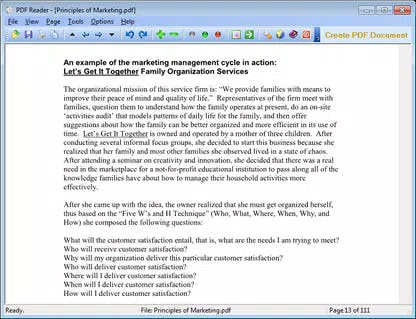
The user interface of PDF Reader for Windows 10 is designed with simplicity and efficiency in mind. It features a clean, minimalist layout that prioritizes document visibility, minimizing distractions while maximizing usability. Navigation is intuitive, with clearly labeled tools for zoom, rotation, and page navigation, accessible through both the toolbar and keyboard shortcuts.
Users can expect a responsive experience across different device categories, though specific performance metrics were not disclosed. The developer did not list formal performance benchmarks, but the app’s lightweight footprint of 12.4 MB suggests optimized resource usage. Responsiveness remains consistent during routine operations such as scrolling, zooming, and switching between pages.
Stability appears to be a strength, as the app is designed as a native Windows 10 application, avoiding the potential bugs associated with sandboxed or web-based viewers. The absence of a Metro UI ensures a stable desktop experience, reducing the risk of unexpected crashes during extended use. While no formal testing data was provided, the app’s ability to handle diverse PDF files without reported issues indicates reliable operation.
Platform Compatibility & Technical Requirements
PDF Reader for Windows 10 is explicitly designed for Microsoft Windows 10, supporting both 32-bit and 64-bit architectures. The application is available as a standalone executable, making it accessible to users without requiring installation through a marketplace. The file size is 12.4 MB, indicating a compact and efficient distribution package.
Although the developer did not specify minimum OS requirements or hardware specifications, the app’s lightweight nature suggests compatibility with most modern Windows 10 systems. The software version is 2.1.0, released on May 15, 2024. Users can expect smooth operation on devices with standard configurations, though specific compatibility details were not listed.
Pros and Cons
Pros
- Fast and lightweight performance with quick PDF loading times
- Supports text and graphic extraction with simple mouse selection
- Offers slideshow functionality for interactive document viewing
- Enables conversion of PDFs to multiple image and text formats
- Seamless integration with the Windows 10 desktop environment
- Free to download and use without in-app purchases or ads
Cons
- Specific system requirements were not disclosed by the developer
- No information provided about update frequency or future development plans
- Compatibility with older Windows versions was not confirmed
- Limited visibility into security protocols or data handling practices
- Developer did not provide a detailed changelog for version 2.1.0
FAQ
Is PDF Reader for Windows 10 safe to download?
The app is available as a free download from trusted sources. While the developer did not publish detailed security documentation, the absence of ads or intrusive permissions suggests a secure distribution model.
Can I use this app on Windows 11?
Although the app is designed for Windows 10, it may function on Windows 11 due to shared system architecture. However, compatibility was not officially confirmed by the developer.
Does the app support password-protected PDFs?
The developer did not specify whether the app supports encrypted or password-protected PDF files. Users are advised to test this feature with their documents.
How often are updates released?
Update frequency was not disclosed. The latest version is 2.1.0, released on May 15, 2024. Users should monitor the official source for new releases.
Can I set PDF Reader for Windows 10 as my default PDF viewer?
Yes, the app is designed to be associated with PDF file types, allowing users to set it as the default viewer for seamless access.
Final Thoughts
PDF Reader for Windows 10 stands out as a fast, reliable, and feature-rich utility for anyone managing PDF documents on a Windows 10 device. Its lightweight design, combined with powerful tools like text extraction, format conversion, and slideshow viewing, makes it a practical choice for students, professionals, and everyday users. The seamless desktop integration and lack of ads or in-app purchases further enhance its appeal.
While some technical details remain undisclosed, the app delivers consistent performance and a clean user experience. For those seeking a secure, efficient, and free PDF tool, this application offers strong value. Its ability to handle common document tasks with ease positions it as a top contender in the productivity space.
Download PDF Reader for Windows 10 now


